
Webhooks
How Webhooks Work
Webhooks send real-time notifications to your server when payment events occur on your Nomod account. Use them to automate order fulfilment, reconciliation, and customer communication without polling the API.
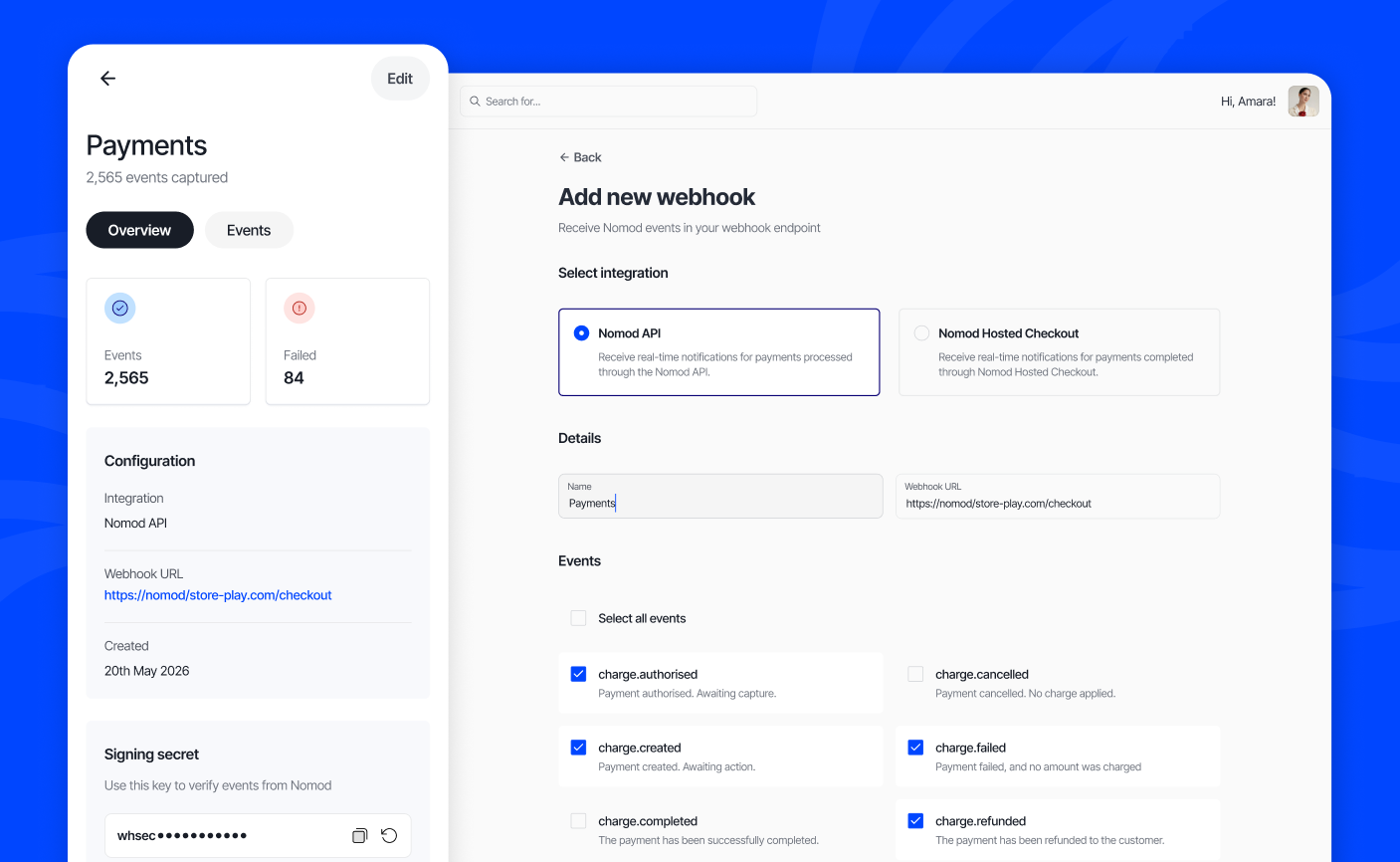
How Webhooks work
When a payment event occurs, for example, a charge is completed, or a refund is issued, Nomod sends an HTTP POST request to the URL you have configured. The request includes a signed JSON payload containing details of the event.
You can configure webhooks for two integration types:
- Nomod API: for transactions processed through the Nomod API directly
- Nomod Hosted Checkout: for transactions processed through Nomod's hosted checkout page
Each webhook is tied to one integration type. You can create separate webhooks for each.
Creating a webhook
- Go to Settings > Tools & customisations > Apps & APIs
- Select Webhooks > Create webhook
- Select an integration type (Nomod API or Nomod Hosted Checkout)
- Tap Continue
- Select one or more events from the list
- Tap Continue
- Enter a name for the webhook
- Enter your webhook URL; this is the endpoint on your server where Nomod will send event notifications
- Tap Create webhook
Firewall configuration
Nomod sends webhook events from the following IP addresses. If your server uses a firewall, add these to your allowlist to ensure events are delivered.
| Type | Address |
|---|---|
| IPv4 | 52.215.16.239 |
| IPv4 | 54.216.8.72 |
| IPv4 | 63.33.109.123 |
| IPv6 range | 2a05:d028:17:8000::/56 |
Allow listing by platform
AWS Security Groups: Add an inbound rule allowing TCP port 443 from each of the IP addresses above.
GCP Firewall Rules: Create an ingress rule allowing TCP traffic on port 443 from the IP addresses above.
Cloudflare Web Application Firewall (WAF): Add an IP Access Rule to allow each of the IP addresses above.
nginx: Add the following to your server block:
allow 52.215.16.239;
allow 54.216.8.72;
allow 63.33.109.123;
allow 2a05:d028:17:8000::/56;
Webhook events
When creating a webhook, select the events you want to trigger a notification to your endpoint. You can select more than one event per webhook, and each event can be added to more than one webhook.
The following charge events are available:
- charge.created: a payment object has been created and is awaiting customer action
- charge.authorised: funds have been reserved on the customer's card and are awaiting capture
- charge.completed: funds have been captured and settled to your balance
- charge.failed: the payment was declined at authorisation or capture
- charge.cancelled: the authorisation was voided before capture
- charge.refunded: a full refund has been issued
- charge.partially_refunded: a partial refund has been issued; the remaining amount remains settled
- charge.dispute.created: a chargeback or dispute has been opened by the customer
What a webhook payload looks like
Every webhook notification Nomod sends contains a JSON body structured like this:
View full payload example
{
  "type": "charge.completed",
  "eventId": "ab088ef8-7597-475c-aacd-001555fb8bd3",
  "objectId": "ch_5674c95a4fd04e439e6e53f5f6b97323",
  "data": {
    "created": "2026-04-14T10:30:00.000Z",
    "currency": "AED",
    "customFields": null,
    "customer": {
      "businessName": "",
      "email": "[email protected]",
      "firstName": "First",
      "id": "cfc70a58-a438-4740-a122-873e23cccdb8",
      "lastName": "Last",
      "phoneNumber": "55XXXXXXXX"
    },
    "customerDccExchangeRate": null,
    "customerInfo": {
      "email": "[email protected]",
      "firstName": "Customer",
      "lastName": "Last",
      "phoneNumber": "55XXXXXXXX"
    },
    "dccExchangeRate": "1.0000000000",
    "dccIntent": null,
    "discount": "0.000",
    "discountPercentage": null,
    "error": null,
    "events": [
      {
        "created": "2026-04-14T10:31:00.000Z",
        "message": "Paid",
        "type": "completed",
        "user": {
          "firstName": "Admin",
          "id": "ae85b322-4453-4676-b4e5-0ce3133d7333",
          "lastName": "User",
          "uuid": "ae85b322-4453-4676-b4e5-0ce3133d7333"
        }
      }
    ],
    "failureUrl": null,
    "fee": "3.551",
    "feeBreakdown": {
      "amount": "3.551",
      "currency": "AED",
      "fees": [
        {
          "amount": "3.382",
          "currency": "AED",
          "description": "Charge Fee",
          "details": ["International Card (3.02% + AED 1.00)"]
        },
        {
          "amount": "0.169",
          "currency": "AED",
          "description": "5.00% VAT"
        }
      ]
    },
    "feeTax": "0.169",
    "fxFee": "0.000",
    "id": "5674c95a-4fd0-4e43-9e6e-53f5f6b97323",
    "items": [
      {
        "amount": "75.000",
        "iconUrl": null,
        "name": "Test Item",
        "product": null,
        "quantity": 1,
        "sku": null,
        "totalAmount": "75.000"
      }
    ],
    "net": "75.309",
    "networkCost": { "amount": "0.000", "currency": "AED" },
    "note": "",
    "originalCurrency": "AED",
    "originalRefundTotal": "0.000",
    "originalTotal": "78.860",
    "paymentMethod": "noon",
    "referenceId": 1121,
    "refundTotal": "0.000",
    "refunds": [],
    "serviceFee": "1.830",
    "serviceFeePercentage": "2.37",
    "settlementCurrency": "AED",
    "shippingAddress": null,
    "source": "API",
    "status": "paid",
    "successUrl": "https://example.com/success/?charge=6O089ROx&[email protected]",
    "tax": "0.000",
    "tip": "0.000",
    "tipPercentage": "0.00",
    "total": "78.860",
    "user": {
      "firstName": "Admin",
      "id": "ae85b322-4453-4676-b4e5-0ce3133d7333",
      "lastName": "User",
      "uuid": "ae85b322-4453-4676-b4e5-0ce3133d7333"
    },
    "viewCount": 0
  }
}
Where data contains the full event details.
- Use
typeto determine how to handle the event - Use
eventIdto detect and ignore repeated deliveries - Return a
200 OKresponse as quickly as possible. If your endpoint takes too long to respond, Nomod treats the delivery as failed and retries automatically
What happens next
Once you create a webhook, it appears in your Webhooks list under its integration type. Nomod begins sending notifications to your endpoint for the events you selected. Verify the signature on every incoming request to keep your endpoint secure.
To manage your webhooks, see Managing Webhooks. To verify signatures on incoming requests, see Verifying Webhook Signatures.